The Excel WEEKNUM function takes a date and returns a week number (1-54) that corresponds to the week of year. The WEEKNUM function starts counting with the week that contains January 1. By default, weeks begin on Sunday.
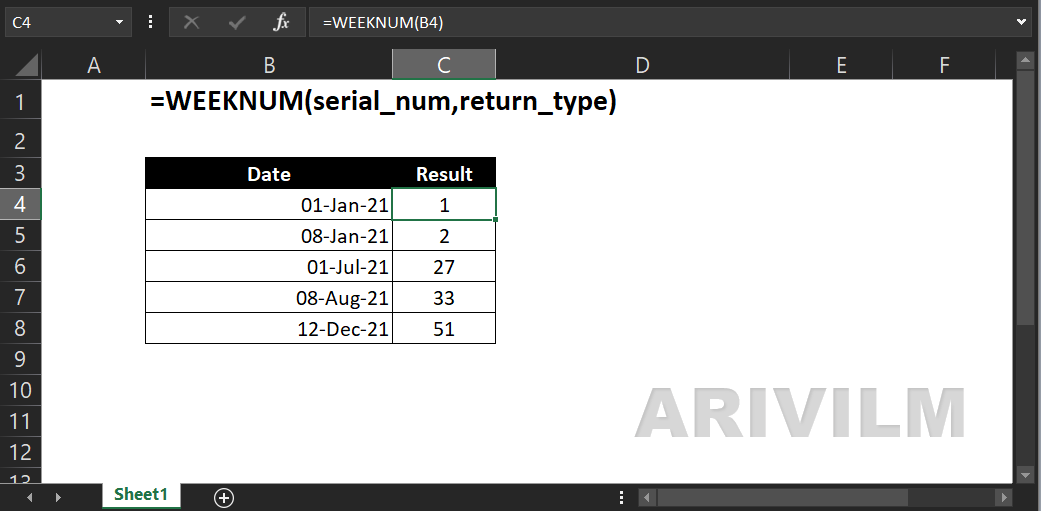
Syntax
The syntax for the WEEKNUM function in Microsoft Excel is:
=WEEKNUM( serial_date [, firstdayofweek ] )
Parameters or Arguments
serial_date
The serial date value from which to calculate the week number.
firstdayofweek
Optional. It is a number that specifies the first day of the week for the year. If this parameter is omitted, it defaults to 1. This parameter can be one of the following values:
1 – (default)Week starts on Sunday and week containing January 1 is the first week of the year
2 – Week starts on Monday and week containing January 1 is the first week of the year
11 – Week starts on Monday and week containing January 1 is the first week of the year
12 – Week starts on Tuesday and week containing January 1 is the first week of the year
13 – Week starts on Wednesday and week containing January 1 is the first week of the year
14 – Week starts on Thursday and week containing January 1 is the first week of the year
15 – Week starts on Friday and week containing January 1 is the first week of the year
16 – Week starts on Saturday and week containing January 1 is the first week of the year
17 – Week starts on Sunday and week containing January 1 is the first week of the year
21 – Week starts on Monday and the week containing the first Thursday of the year is the first week of the year (commonly known as the European week numbering system)
Returns
The WEEKNUM function returns a numeric value.
Weeknum Function Examples
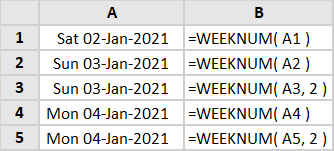
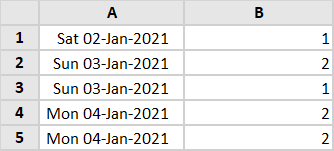
Column B of the spreadsheet below contains 5 examples of the Excel Weeknum Function.
Formulas:
Results:
Weeknum Function Errors
If you get an error from the Excel Weeknum function, this is likely to be one of the following:
#NUM!
Occurs if The supplied [return_type] argument is not one of the permitted values (see above table).
or
Occurs if The supplied serial_number argument is numeric but is out of range for the current date base.
#VALUE!
Occurs if the supplied serial_number cannot be recognised as a numeric value or a date.