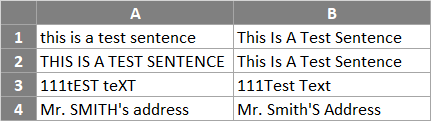
The Microsoft Excel PROPER function sets the first character in each word to uppercase and the rest to lowercase.
Warning: as well as the first letter of every word, letters following numbers or other punctuation are converted to upper case by the Excel Proper function. This may be in places that you might not expect. For example, the function converts the “s” in the text string “Bob’s Boat” to upper case (i.e. “Bob’S Boat”).
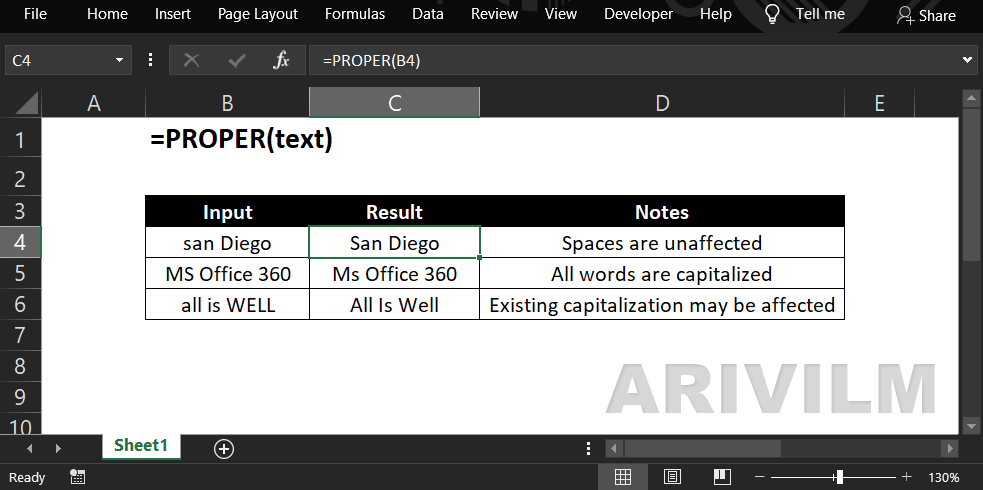
Syntax
The syntax for the PROPER function in Microsoft Excel is:
=PROPER( text )
Parameters or Arguments
text
The string argument whose first character in each word will be converted to uppercase and all remaining characters converted to lowercase.
Proper Function Examples
In the following spreadsheet, the Excel Proper function is used to convert four text strings to proper case:
Formulas:
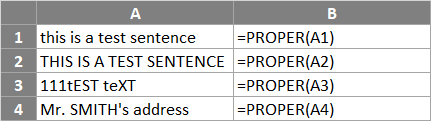
Results: